
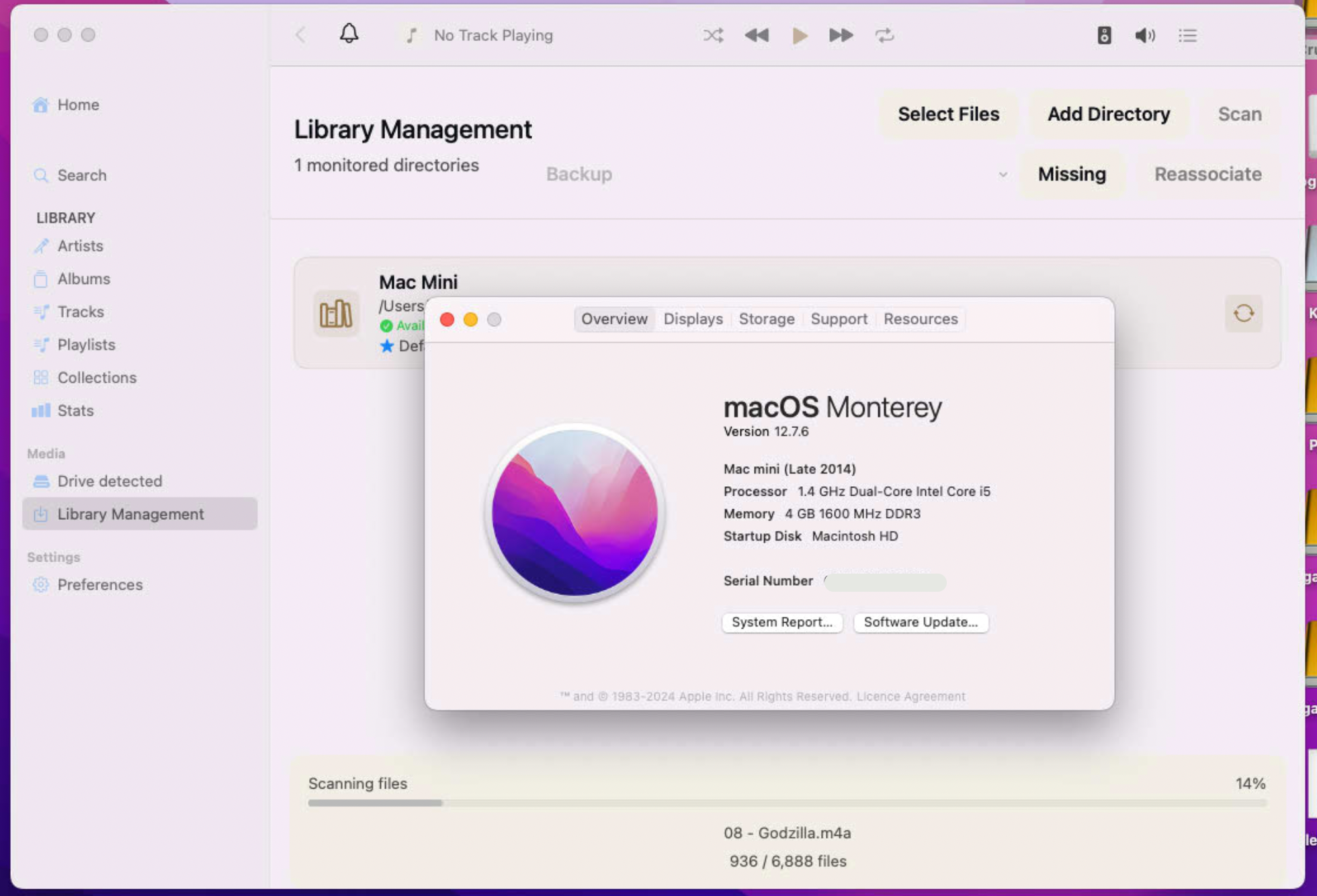
 Kanora's Library Management screen running on macOS Monterey 12.7.6, with the About This Mac window open over it showing a Mac mini (Late 2014), 1.4 GHz dual-core Intel Core i5 and 4 GB of memory. A progress bar at the bottom reads "Scanning files, 14%", 936 of 6,888 files.
There is a Late-2014 Mac mini on a shelf in my house. It has a 1.4 GHz dual-core i5 and four gigabytes of RAM. The only thing I have ever done to it is put a one-terabyte SSD in it a couple of years ago, which I am currently very pleased about, given what SSDs cost this year.
For a long time that mini ran Apple Music, and held my library, and did the one job I asked of it. Then it started losing albums. Not deleting files I had ripped, but quietly removing tracks and sometimes whole records from the library view as the licences behind them lapsed. Things I owned on disc, sitting in a shelf ten feet away, stopped being visible in the app that was supposed to be showing me my collection.
That is the reason Kanora exists. The whole project starts at that moment, on that machine.
How I drifted away from it
Here is the part I did not plan.
Once Kanora became a real codebase, I built it on my M1 Pro MacBook Pro, because that is the
machine I write code on. The default stack follows the machine. Modern macOS, current SwiftUI,
NavigationStack and NavigationSplitView everywhere, every API Xcode offers without a
complaint. None of that was a decision. It was just what you get when you open a new project and
start working.
Two years later the app was good, and it would not run on the machine that caused it to exist. The mini is stuck on macOS 12.7.6. Monterey. Nothing I had written would even compile for it.
I looked at this properly last July and gave up. The navigation APIs were load-bearing across about fifty screens, and rebuilding all of that for one old computer was not a sane use of my evenings. That item was archived as abandoned, with the reasoning written down, which turned out to matter.
What made it cheap in the end
When I came back to it this month, the first thing I did was count, rather than estimate.
The July number was wrong. It had counted the navigation surface of the entire cross-platform app.
But Monterey only constrains macOS. Nobody is asking for an iOS 15 build, so the iPhone, iPad,
Watch and TV apps keep their existing floors, and a large slice of what July counted sits behind
#if os(iOS) and never reaches a Mac at all.
Counted by walking the conditional-compilation regions instead of whole files: 60 macOS-reachable
NavigationStack sites rather than 100. One NavigationSplitView, in one file. The genuinely
awkward part, value-based navigationDestination, which has no clean pre-13 equivalent, came to 11
sites across four shipping files rather than thirty.
The application shell is one file.
That is not luck. That is the layering I insisted on early, when it felt like overkill: the library, the playback engine, the Companion API and the design system are separate from the views, and the views are separate per platform. I have spent a career arguing for that kind of separation in other people's systems. This is the first time I have been handed the bill for not doing it, in reverse. The bill was small because the work was already done.
So the decision was: one application, one target, deployment target 12.0, version-conditional navigation at the container level. Not a cut-down host console, not a headless daemon, not a reduced surface for the old machine. The same app.
The part that was genuinely strange to watch
I gave an agent its own SSH credentials to the mini on my home network, and a requirement: make this work on this hardware.
What it did with that was run the development process I had already written down. It produced a plan from the requirement. A spec-writing agent turned the plan into a spec. A development agent picked up the plan and the spec, broke them into tasks, and worked the tasks. Then it handed off to a QA agent, which took the same spec and plan and checked the work against them, and sent it back round a couple of times with things to fix.
Before it touched the app at all, it was writing small standalone programs, pushing them to the mini, and running them there to find out what that version of the OS actually does. Not asking me. Not guessing from documentation. Measuring, on the hardware, and then writing the result down.
And the whole time it was pulling screenshots off a headless Mac mini over SSH and putting them back into the chat, so both of us could look at the same window.
I sat and watched it work on its own for a couple of hours. It cost me a step up in my Claude subscription, to the ninety-pound bracket, and the evening.
None of this took very long, which is still the part I find hardest to believe. A couple of evenings and a couple of sessions. The thing I had written off last summer as too much work for one old computer just quietly got done, mostly because I was not the one doing the typing.
This is the kind of work I think AI is genuinely good for, and it is a more interesting case than the demos. Backporting an app to old hardware is not fun. It adds no features. Nobody is asking for it. It is retrospective correction of a path you already went too far down, and on a side project, in the evenings, that work simply never happens. You look at it, you do the sums, you close the laptop. That is precisely what I did last July.
This is where side projects die, incidentally. Not at the start, when it is all interesting. Later, at the point where you realise you have gone too far down the wrong path to be bothered correcting it. I have a graveyard of these behind me. You get excited, you write some code, you get something basic working, and then you see clearly how you should have built it in the first place. The correction is tedious. It produces nothing you can show anyone. And it is competing for the same evenings and weekends that the fun part was using. So the project stops, usually without a decision ever being made. It just stops being the thing you open.
Enter Claude.
What changed is not that the work got smaller. It is that I stopped having to be the one grinding through it.
Compiling is not running
The best thing I can tell you about this work is how much of it was not the navigation rewrite.
The app compiled at a 12.0 deployment target on the first serious attempt, 29 passes, clean build from scratch. Then it launched on the mini and showed no window.
That took a while, and it was not the app. Screen captures taken over SSH show no windows at all until the SSH daemon itself has been granted Screen Recording on that machine. The agent had been looking at a correct app through a broken camera.
The genuinely nasty one: code that compiles for macOS 12.0 can still crash on macOS 12.7.6, because
the older Swift runtime on that OS is being asked to demangle newer mangling. Combine's reflective
objectWillChange over a stored async closure segfaults, with no frames of my code in the report.
The fix is one explicit line per class. Finding it meant driving the UI from one SSH session while
lldb sat on the process in another.
And then the small indignities of a nine-year-old SwiftUI implementation. ProgressView is an
NSProgressIndicator underneath and traps inside fractional frames. ViewThatFits does not exist
before 13. A Menu with a custom label is a pop-up button, and macOS 12 lifts any image out of the
label and redraws it at the cell's leading edge, framed or padded or buried in a stack, it does not
care. Getting one glyph to sit in the middle of one pill took four deploys to the mini.
Where it actually is
The screenshot at the top of this post is Kanora on macOS 12.7.6, on the Late-2014 mini, scanning 6,888 files into the library. Full app. Same sidebar, same library management, same scan.
The CD ripping works there too. Eight tracks off a disc, encoded to ALAC with the cover art embedded, imported, on a twelve-year-old dual-core. Along the way that turned up a real bug that had nothing to do with old hardware: a rip that marked every track complete and wrote nothing to disk, on any Mac. The old machine found it because the old machine is slow enough to watch.
Not everything is done. macOS 12.7.6 currently reads no FLAC tags at all, whether they came from ffmpeg, from my own prototype writer, or from a real rip, and that is an open bug with a ticket, not a thing I am going to dress up. Native tagging is the next piece of work and it is already scoped.
And the standing caveat: Kanora has not been released to anyone except me. This is a lab notebook, not a product announcement. If you want to read it as a promise, please don't.
Why this one mattered to me
The original goal was never "support legacy hardware" as a feature bullet. It was that the machine sitting on my shelf, which I already own, which already has my music on it, should be able to run the thing I built because that machine let me down.
It does now. It is a mediocre computer from 2014 with four gigabytes of RAM and an SSD I am glad I bought before the prices went stupid, and it is running the whole application.
The project has come back round to where it started.